Our Eye-beams Begin to Twist
Part 3: Our Eye-beams Begin to Twist
This continues the introduction started here. You can find an index to the entire series here.
Doing Nothing, the Twisted Way
Eventually we are going to re-implement our asynchronous poetry client using Twisted. But first let’s write a few really simple Twisted programs just to get the flavor of things. As I mentioned in Part 2, I developed these examples using Twisted 8.2.0. Twisted APIs do change, but the core APIs we are going to use will likely change slowly, if at all, so I expect these examples to work for many future releases. If you don’t have Twisted installed you can obtain it here.
The absolute simplest Twisted program is listed below, and is also available in basic-twisted/simple.py in the base directory of the twisted-intro example code.
from twisted.internet import reactor
reactor.run()
You can run it like this:
python basic-twisted/simple.py
As we saw in Part 2, Twisted is an implementation of the Reactor Pattern and thus contains an object that represents the reactor, or event loop, that is the heart of any Twisted program. The first line of our program imports the reactor object so we can use it, and the second line tells the reactor to start running the loop.
This program just sits there doing nothing. You’ll have to stop it by pressing Control-C, otherwise it will just sit there forever. Normally we would have given the loop one or more file descriptors (connected to, say, a poetry server) that we want to monitor for I/O. We’ll see how to do that later, but for now our reactor loop is stuck. Note that this is not a busy loop which keeps cycling over and over. If you happen to have a CPU meter on your screen, you won’t see any spikes caused by this technically infinite loop. In fact, our program isn’t using any CPU at all. Instead, the reactor is stuck at the top cycle of Figure 5, waiting for an event that will never come (to be specific, waiting on a select call with no file descriptors).
That might make for a compelling metaphor of Hamletian inaction, but it’s still a pretty boring program. We’re about to make it more interesting, but we can already draw a few conclusions:
- Twisted’s reactor loop doesn’t start until told to. You start it by calling
reactor.run(). - The reactor loop runs in the same thread it was started in. In this case, it runs in the main (and only) thread.
- Once the loop starts up, it just keeps going. The reactor is now “in control” of the program (or the specific thread it was started in).
- If it doesn’t have anything to do, the reactor loop does not consume CPU.
- The reactor isn’t created explicitly, just imported.
That last point is worth elaborating on. In Twisted, the reactor is basically a Singleton. There is only one reactor object and it is created implicitly when you import it. If you open the reactor module in the twisted.internet package you will find very little code. The actual implementation resides in other files (see, for example, twisted.internet.selectreactor).
Twisted actually contains multiple reactor implementations. As mentioned in Part 2, the select call is just one method of waiting on file descriptors. Twisted includes several reactor implementations that use a variety of different methods. For example, twisted.internet.pollreactor uses the poll system call instead of select.
To use a specific reactor, you must install it before importing twisted.internet.reactor. Here is how you install the pollreactor:
from twisted.internet import pollreactor
pollreactor.install()
If you import twisted.internet.reactor without first installing a specific reactor implementation, then Twisted will install the default reactor for you. The particular one you get will depend on the operating system and Twisted version you are using. For that reason, it is general practice not to import the reactor at the top level of modules to avoid accidentally installing the default reactor. Instead, import the reactor in the same scope in which you use it.
Note: as of this writing, Twisted has been moving gradually towards an architecture which would allow multiple reactors to co-exist. In this scheme, a reactor object would be passed around as a reference rather than imported from a module.
Note: not all operating systems support the poll call. If that is the case for your system, this example will not work.
Now we can re-implement our first Twisted program using the pollreactor, as found in basic-twisted/simple-poll.py:
from twisted.internet import pollreactor
pollreactor.install()

from twisted.internet import reactor
reactor.run()
And we have a poll loop that does nothing at all instead of a select loop that does nothing at all. Neato.
We’re going to stick with the default reactor for the rest of this introduction. For the purposes of learning Twisted, all the reactors do the same thing.
Hello, Twisted
Let’s make a Twisted program that at least does something. Here’s one that prints a message to the terminal window, after the reactor loop starts up:
def hello():
    print 'Hello from the reactor loop!'
    print 'Lately I feel like I\'m stuck in a rut.'

from twisted.internet import reactor

reactor.callWhenRunning(hello)

print 'Starting the reactor.'
reactor.run()
This program is in basic-twisted/hello.py. If you run it, you will see this output:
Starting the reactor.
Hello from the reactor loop!
Lately I feel like I'm stuck in a rut.
You’ll still have to kill the program yourself, since it gets stuck again after printing those lines.
Notice the hello function is called after the reactor starts running. That means it is called by the reactor itself, so Twisted code must be calling our function. We arrange for this to happen by invoking the reactor method callWhenRunning with a reference to the function we want Twisted to call. And, of course, we have to do that before we start the reactor.
We use the term callback to describe the reference to the hello function. A callback is a function reference that we give to Twisted (or any other framework) that Twisted will use to “call us back” at the appropriate time, in this case right after the reactor loop starts up. Since Twisted’s loop is separate from our code, most interactions between the reactor core and our business logic will begin with a callback to a function we gave to Twisted using various APIs.
We can see how Twisted is calling our code using this program:
import traceback

def stack():
    print 'The python stack:'
    traceback.print_stack()

from twisted.internet import reactor
reactor.callWhenRunning(stack)
reactor.run()
You can find it in basic-twisted/stack.py and it prints out something like this:
The python stack:
...
  reactor.run() <-- This is where we called the reactor
...
...  <-- A bunch of Twisted function calls
...
  traceback.print_stack() <-- The second line in the stack function
Don’t worry about all the Twisted calls in between. Just notice the relationship between the reactor.run() call and our callback.
What’s the deal with callbacks?
Twisted is not the only reactor framework that uses callbacks. The older asynchronous Python frameworks Medusa and asyncore also use them. As do the GUI toolkits GTK and QT, both based, like many GUI frameworks, on a reactor loop.
The developers of reactive systems sure love callbacks. Maybe they should just marry them. Maybe they already did. But consider this:
- The reactor pattern is single-threaded.
- A reactive framework like Twisted implements the reactor loop so our code doesn’t have to.
- Our code still needs to get called to implement our business logic.
- Since it is “in control” of the single thread, the reactor loop will have to call our code.
- The reactor can’t know in advance which part of our code needs to be called.
In this situation callbacks are not just one option — they are the only real game in town.
Figure 6 shows what happens during a callback:
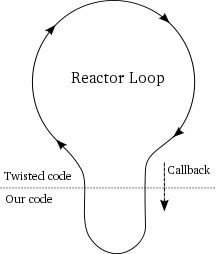
Figure 6 illustrates some important properties of callbacks:
- Our callback code runs in the same thread as the Twisted loop.
- When our callbacks are running, the Twisted loop is not running.
- And vice versa.
- The reactor loop resumes when our callback returns.
During a callback, the Twisted loop is effectively “blocked” on our code. So we should make sure our callback code doesn’t waste any time. In particular, we should avoid making blocking I/O calls in our callbacks. Otherwise, we would be defeating the whole point of using the reactor pattern in the first place. Twisted will not take any special precautions to prevent our code from blocking, we just have to make sure not to do it. As we will eventually see, for the common case of network I/O we don’t have to worry about it as we let Twisted do the asynchronous communication for us.
Other examples of potentially blocking operations include reading or writing from a non-socket file descriptor (like a pipe) or waiting for a subprocess to finish. Exactly how you switch from blocking to non-blocking operations is specific to what you are doing, but there is often a Twisted API that will help you do it. Note that many standard Python functions have no way to switch to a non-blocking mode. For example, the os.system function will always block until the subprocess is finished. That’s just how it works. So when using Twisted, you will have to eschew os.system in favor of the Twisted API for launching subprocesses.
Goodbye, Twisted
It turns out you can tell the Twisted reactor to stop running by using the reactor’s stop method. But once stopped the reactor cannot be restarted, so it’s generally something you do only when your program needs to exit.
Note: there has been past discussion on the Twisted mailing list about making the reactor “restartable” so it could be started and stopped as you like. But as of version 8.2.0, you can only start (and thus stop) the reactor once.
Here’s a program, listed in basic-twisted/countdown.py, which stops the reactor after a 5 second countdown:
class Countdown(object):

    counter = 5

    def count(self):
        if self.counter == 0:
            reactor.stop()
        else:
            print self.counter, '...'
            self.counter -= 1
            reactor.callLater(1, self.count)

from twisted.internet import reactor

reactor.callWhenRunning(Countdown().count)

print 'Start!'
reactor.run()
print 'Stop!'
This program uses the callLater API to register a callback with Twisted. With callLater the callback is the second argument and the first argument is the number of seconds in the future you would like your callback to run. You can use a floating point number to specify a fractional number of seconds, too.
So how does Twisted arrange to execute the callback at the right time? Since this program doesn’t listen on any file descriptors, why doesn’t it get stuck in the select loop like the others? The select call, and the others like it, also accepts an optional timeout value. If a timeout value is supplied and no file descriptors have become ready for I/O within the specified time then the select call will return anyway. Incidentally, by passing a timeout value of zero you can quickly check (or “poll”) a set of file descriptors without blocking at all.
You can think of a timeout as another kind of event the event loop of Figure 5 is waiting for. And Twisted uses timeouts to make sure any “timed callbacks” registered with callLater get called at the right time. Or rather, at approximately the right time. If another callback takes a really long time to execute, a timed callback may be delayed past its schedule. Twisted’s callLater mechanism cannot provide the sort of guarantees required in a hard real-time system.
Here is the output of our countdown program:
Start!
5 ...
4 ...
3 ...
2 ...
1 ...
Stop!
Note the “Stop!” line at the ends shows us that when the reactor exits, the reactor.run call returns. And we have a program that stops all by itself.
Take That, Twisted
Since Twisted often ends up calling our code in the form of callbacks, you might wonder what happens when a callback raises an exception. Let’s try it out. The program in basic-twisted/exception.py raises an exception in one callback, but behaves normally in another:
def falldown():
    raise Exception('I fall down.')

def upagain():
    print 'But I get up again.'
    reactor.stop()

from twisted.internet import reactor

reactor.callWhenRunning(falldown)
reactor.callWhenRunning(upagain)

print 'Starting the reactor.'
reactor.run()
When you run it at the command line, you will see this output:
Starting the reactor.
Traceback (most recent call last):
  ... # I removed most of the traceback
exceptions.Exception: I fall down.
But I get up again.
Notice the second callback runs after the first, even though we see the traceback from the exception the first raised. And if you comment out the reactor.stop() call, the program will just keep running forever. So the reactor will keep going even when our callbacks fail (though it will report the exception).
Network servers generally need to be pretty robust pieces of software. They’re not supposed to crash whenever any random bug shows its head. That’s not to say we should be lackadaisical when it comes to handling our own errors, but it’s nice to know Twisted has our back.
Poetry, Please
Now we’re ready to grab some poetry with Twisted. In Part 4, we will implement a Twisted version of our asynchronous poetry client.
Suggested Exercises
- Update the countdown.py program to have three independently running counters going at different rates. Stop the reactor when all counters have finished.
- Consider the
LoopingCallclass in twisted.internet.task. Rewrite the countdown program above to useLoopingCall. You only need thestartandstopmethods and you don’t need to use the “deferred” return value in any way. We’ll learn what a “deferred” value is in a later Part.
luisbg
in the countdown app you are doing import the reactor twice. I don't think that's neccesary, the code runs fine without the one in line 7.
dave
Hey Luis, that's a good point, there's no actual need for the inline import. I'm going to go ahead
and leave it, though. Since most reactor imports are done inline, it's still a good example of typical
usage, I think.
Cyril Pauya
Hi, this is a very good introduction to Twisted + callbacks.
I did your suggested exercises and learned more. Thanks.
dave
You're welcome.
Ted
Thanks for the intro. Maybe a dumb question here, after I install a reactor will subsequent imports of reactor from twisted internet still use my installed reactor?
dave
They will, yes.
Marius Flage
I was wondering about the same thing and doing line 6 confused me quite a bit. Doing further investigating reveals that it's not needed. So I'd suggest removing that from the code altogether. It confused me, at least :)
dave
Fair enough, I will take it out.
Mark Wallace
Me again :) Any idea why this, when trying to run basic-twisted/simple-poll.py:
File "/System/Library/Frameworks/Python.framework/Versions/2.6/Extras/lib/python/twisted/internet/pollreactor.py", line 19, in
from select import error as SelectError, poll
Been beating my head against it for quite a while now. Do pardon whatever obvious thing I'm undoubtedly missing (or operator error, more likely).
Mark Wallace
Hilarious: I can't even report the problem correctly.
Here's what I was actually wondering about:
"ImportError: cannot import name poll"
Where is 'select' supposed to be found? The error message seems to imply that 'error' itself has been imported correctly, but that 'poll' can't be located, yes? Any insights greatly appreciated.
dave
Hm, it may be that poll() is not available on Mac OS. I'll check when I get home later. But it's safe to skip over that one for now :)
dave
Hey Mark, I'm pretty sure poll just isn't available on Mac OS. I updated the text to indicate that possibility.
Narada
Hi Dave! I'm trying to complete suggested exercise #2(LoopingCall), it's working ok, but did i understand right the way how i should implement that?
https://gist.github.com/899383
Many thanks for any thoughts.
dave
Looks like the right track to me! I think it can be simplified a bit, see my comment here:
https://gist.github.com/900799
Felipe
Thanks for this wonderful tutorial, Dave! You're a wonderful teacher. Just wanted to share my approach for the second question, since I'm quite proud of it :) http://pastebin.com/n4UkHcpv
Thanks again!
dave
Thank you, and nice solution!
jmb
Hello Felipe,
I didn't succeed to run your solution without changing
line 10 : print "LoopCall # {} down to {}".format(index, counters[index])
by
print "LoopCall # {0} down to {1}".format(index, counters[index])
copy/paste problem ?
regards
Kwami
probably python versions. If I recall correctly, in 2.6 and earlier, you have to explicitly specify your var indices. My guess is Felipe is using 2.7 or higher...
Mike Nerone
Hi, Dave! I've really been enjoying your tutorial - your teaching style is both clear *and* entertaining. Thanks for the time you put in!
Here's my exercise #2 solution: https://gist.github.com/1057650
Win? :)
dave
Glad you like the series!
I think you've got yourself a a solution there, nicely done. I do think it would be better to avoid sub-classing LoopingCall. How would you do that?
Mike Nerone
But that's my favorite part! :P
dave
Fair enough :)
Fabian
Hey Dave,
I'm quite new to Twisted Programming, and I have a question regarding the NotRestartable thingy: what if the sockets and factories the SelectReactor shall deal with, change during runtime? Say, an IP address changed, or - in my case - you got seperate modules for each Protocol which are not known at the moment the reactor.run()s ?
As you cannot restart the reactor, I see the following options:
- Change to poll reactor to have one reactor for each Protocol: not possible in my case (Mac OSX)
- Change Program Architecture to start Reactor after sockets are known
Are there any further options?
Cheers
Fabian
THIMC, there's a discussion on the mailing list about that:
http://twistedmatrix.com/pipermail/twisted-python/2011-September/024511.html
dave
Hey Fabian, I didn't have time to respond to your post yesterday. The short answer is that it's definitely
possible, just do those same calls to connect to a port while your program is running rather than on startup.
But now that you have the question out on the Twisted mailing list, you should get some detailed answers.
Fabian
The trick is to make an initial connection.
I just did an initial reactor.run() and somewhen later made the first reactor.connectTCP() - it just got stuck then.
It'll work if you provide the reactor with a connectTCP() to some kind of Fake Protocol BEFORE calling reactor.run() :-)
dave
Interesting solution :) You can always call reactor.connectTCP after the reactor starts and you don't need to call it even once
before it does so. However, you will need to arrange for some callback to be invoked when you are ready to make
the connection. Consider the reactor.callLater() function, for example.
Marconi
Here's mine https://gist.github.com/ca286ba6e48148d8ac02 ;D
dave
Looking good, but I think it stops as soon as any one of the counters finishes, instead of after the last one.
Pastafarianist
Here's my solution for #1. I don't really believe this is the best approach but since the counters have to communicate somehow between each other in order to decide when to call reactor.stop() the only solution I managed to come up with was global variables.
http://dl.dropbox.com/u/11996458/countdown.py
I would greatly appreciate if someone could give me a hint on how this could could be solved in a better way.
P.S.: I'm not a native speaker, so excuse me for any mistakes I could have made :)
dave
Your solution certainly works! And your English is very good, don't worry.
To get rid of the global variable, you could pass a shared object to each
of the counters and have them invoke a method on it when the counter
is done. And then that separate object could be in charge of shutting down
the reactor instead of the counters. You could even just pass a reference
to the method itself, as a 'callback', which is kind of looking forward to the
next parts.
Lauren
Hi, Thank you for the awesome tutorial.
Here is my solution for Exercise 2: http://pastebin.com/pyGYfdUM
Learned a lot by doing this! I recommend that everyone do the exercises. :)
dave
Nicely done, and you are welcome!
Lauren
I did have one question,
Out of curiosity, I commented out the line that did stopped the looping call. The code still worked. I suspected this was a bad idea, but why?
dave
It still printed out the right things because of that '
if self.counter:'guard in your
count()method. Although the loops keep running after theyreach zero, they don't print anything out. And when you stop the reactor it doesn't
wait for
LoopingCalls(which are implemented usingreactor.callLater()).But it's still much better to stop those loops when you don't need them. They will
take up some CPU because they keep looping, and if you accumulate a lot of them then
that will add up.
Lauren
Oh of course! Thank ye kindly
Amit
Very well explained .
I am new to python and having some problem in exercise :
this is link to my solution of exercise1 :http://pastebin.com/T5hihtTM
this is giving some errors, please give it a look!!(i m sure i m not using select.select() correctly )
I was looking at solution of Narada , https://gist.github.com/899383 . It is looking sync to me . I mean where is outer loop which keep care of which counter to run which time (which is not blocked).
I know these are silly things to ask and not worthy of your time ,but i have tried myself to understand and no success. Hoping your explanation will help me to understand later parts in better way.
dave
Hi Amit, in Part 3 you don't need the outer loop because the Twisted reactor provides that loop for you -- the loop starts when you call reactor.run() and that function doesn't return until the loop finally stops. So there is no need for your own loop (and no need for a select() call since there are no sockets to listen on).
Does that make sense?
dave
Fred
Hi Dave! Thanks for tutorial, I really like the way you explain.
One question I have is, how does Twisted benefits from smaller tasks (callbacks)? Would it make any difference for one single request, if I do say 100 smaller callbacks instead of 10 bigger? In the end, its the same amount of work. And those callbacks do they work actually blocking the reactor for a small period of time, right?
dave
Yes, you are right that it is about the same amount of work (the 100 requests
do have the extra function call overhead). And while a callback (any callback)
is running, the reactor cannot service any other requests. If your server only
ever handles one request at a time, then it wouldn't make any difference. Of
course, if your server only handles one request at a time, then there's no
real reason to use the asynchronous model either.
slothy
Thanks for the tuto! I'm enjoying very much!
Here mine http://dpaste.com/hold/760217/
Anybody has a solution without globals???
I cant find it.
slothy
Yes....it has a very big problem with the names...;)
dave
Glad you liked the tutorial. Could you pass the Control
object to each instance of Countdown instead of using global?
umi
I love how you explicitly point out things like "when our callbacks are running, the Twisted loop is not running"! It really helps :)
Seth
Hi Dave,
Thanks for the tutorial. I'm new to python and async. I'm getting some errors in my attempt at exercise 1. My thoughts were to pass in a separate object that would store a dictionary of the different counters and their respective counts and would check for when the counters all were down to zero. However, I think that my class is running outside the reactor as any debugging print statements happen before the reactor start message. I think that this is the root of my issues. My 'complete' method is tossing errors that I don't understand. Any insight you could offer would be a great assistance! Thanks! http://dpaste.com/hold/788866/
dave
Hey Seth, welcome to Python! The reason why you have some code running before
the reactor starts is because the calls to .count() in callWhenRunning are
happening before you call callWhenRunning. The argument to callWhenRunning
should be a function reference (the function you want to call when the reactor
is running), plus whatever arguments you want to pass to that function when
it is actually called. So you need something like:
reactor.callWhenRunning(Countdown().count, groupCounter)
Does that make sense? Since you are new to Python, I have implemented a version
of your idea in a bit more of a 'Pythonic way' here,
if you interested, but feel free to figure it out on your own first if you like.
Seth
Dave,
Excellent! That makes complete sense. By looking at the documentation, apparently, passing group_counter (lines 50-52 in your re-write of my code) is available in def count (line 28) by being the second parameter in callWhenRunning. Thanks a ton!
mike
Thanks for the tutorial. I've done some asyn sockets in C, but was struggling to wrap my head around the programming model of twisted. Here's my code for exercise 2.: https://gist.github.com/3433337
dave
Nicely done!
Dave
Hi Dave,
I'm having trouble with exercise #1. You did refer to it in another reply, but it doesn't show up. Can you repeat it or provide a new link?
Your tutorial is fantastic -- very well written and even fun to read.
Thanks,
dave
Dave
I found the (a) solution:
#!/usr/bin/env python
class Countdown(object):
number_running = 0
def __init__(self, max):
self.max_count = max
self.counter = self.max_count
Countdown.number_running += 1
def count_down(self):
if self.counter == 0:
Countdown.number_running -= 1
if Countdown.number_running == 0:
reactor.stop()
else:
print self.counter, '...'
self.counter -= 1
reactor.callLater(1, self.count_down)
from twisted.internet import reactor
counter1 = Countdown(5)
counter2 = Countdown(10)
counter3 = Countdown(15)
reactor.callWhenRunning(counter1.count_down)
reactor.callWhenRunning(counter2.count_down)
reactor.callWhenRunning(counter3.count_down)
print 'Start!'
reactor.run()
print 'Stop!'
dave
Nicely done! Glad you are liking the tutorial.
Steve Dowling
Hi Dave,
I used your solution as a springboard to my own but I think your solution only works if you have the same delay for each counter. The exercise asked us to have a variable delay and if you follow your code it doesn't work. What I did was to move the if block dealing with the reactor stop below the original "if else" block to deal with this.
No doubt my code can be massively improved, but here's my solution that allows for both variable delay, and number of counts.
class Countdown(object):
number_of_counters = 0
def __init__(self, name="Countdown", delay=1, counter=5):
self.delay = delay
self.counter = counter
self.name = name
Countdown.number_of_counters +=1
def count(self):
if self.counter == 0:
print 'A task (%s) has completed' % (self.name,)
Countdown.number_of_counters -= 1
else:
print self.name, self.counter, '...'
self.counter -= 1
reactor.callLater(self.delay, self.count)
if Countdown.number_of_counters == 0:
print 'Stop the reactor'
reactor.stop()
from twisted.internet import reactor
reactor.callWhenRunning(Countdown("Counter 1",3,3).count)
reactor.callWhenRunning(Countdown("Counter 2",1,3).count)
reactor.callWhenRunning(Countdown().count
print 'Start!'
reactor.run()
print 'Stop!'
And the output is as follows:
Start!
Counter 1 3 ...
Counter 2 3 ...
Countdown 5 ...
Counter 2 2 ...
Countdown 4 ...
Counter 2 1 ...
Countdown 3 ...
Counter 1 2 ...
A task (Counter 2) has completed
Countdown 2 ...
Countdown 1 ...
A task (Countdown) has completed
Counter 1 1 ...
A task (Counter 1) has completed
Stop the reactor
Stop!
Bhaarat
Hi Dave
I tried your code above and it didn't work for me. I don't know the exact reason but what I am guessing is that you have created 3 different objects of the class Countdown so all 3 objects are diff and have no relation/way to communicate between them to see if all the counters have finished or not.
Please correct me if I am wrong.
PS: I am very new to python please pardon if something is wrong with my understanding.
dave
Hi Bhaarat, I looked at the other Dave's code (The one with a capital D is a different Dave than me) and it looks to me like it should eventually stop. The reason is that the number_running variable is a class-level variable (it is accessed via Countdown, not via self) and so it is shared between all instances of the class.
Note it does not have a variable delay as Steve pointed out. I forgot I put that part into the exercise!
Bhaarat
Hi dave thanks for the reply and I get the point, actually I realized this concept soon after posting the doubt but I thought let it get confirmed by others too :). Anyways article is awesome.
daniel ashman
random question here on python, in the following code why is it reactor.callWhenRunning(stack) and NOT reactor.callWhenRunning(stack())... what is the difference in meaning between the two?
def stack():
print 'The python stack:'
traceback.print_stack()
from twisted.internet import reactor
reactor.callWhenRunning(stack)
dave
Hey Daniel, it's the difference between a function call and a function reference.
Consider the following from the interactive interpreter:
The first print shows the
time.timefunction and the second the resultof calling that same function. Now the
callWhenRunningmethod expectsa function reference and it will arrange for the reactor to call that function (using
the reference) when the reactor starts. If we say:
reactor.callWhenRunning(function_name)Then we are passing a function reference the reactor can use to call the function later
by using the () operator. But if we say:
reactor.callWhenRunning(function_name())Then Python will first call function_name and then it will call
callWhenRunningwith the result of the first function call as the first argument.
Whew! Does that make sense?
Zancas
I believe that the "selectreactor" is no longer the deafult reactor. IIUC, "epollreactor" is now the default reactor (at least on linux).
https://twistedmatrix.com/trac/browser/tags/releases/twisted-12.2.0/twisted/internet/default.py
dave
Good point, I have updated the text to make it more general.
Zancas
Sorry... IIUC = "If I Understand Correctly"
plover
Many thanks for this lovely series! I'm new to Twisted and was unfamiliar with asynchronous programming terminology, so this has been a great help.
I've been imagining a "reactor" as the thing keeping the program moving forward, perhaps by spitting out callbacks something like how a nuclear reactor spits out neutrons. While I still like the image, I suspect your account makes more sense...
Here are my solutions for the exercises:
#1: http://pastebin.com/uGjv6Fnh
#2: http://pastebin.com/hqpGcJnm
I actually came up with the two different approaches as solutions for #1, and then altered one of them to use LoopingCall.
Is my sense that #2 (with or without LoopingCall) seems more "Twisted flavored" correct? And is the instinct (also in #2) to remove the call to reactor.stop from other callbacks, a good one (even if unnecessary here)?
dave
You are welcome! I quite like the imagery of a Twisted reactor firing out callbacks like a nuclear reactor firing off neutrons. And since the Twisted reactor really is driving the whole show, I think it definitely works well as a metaphor.
Using LoopingCall would probably be what most Twisted developers would use because, well, it's already there :)
Your instinct to move the reactor.stop call from the Countdown object is definitely a good one. Few objects will
need to call reactor.stop and it doesn't make much sense in the Countdown object. I like the second solution better
because the Countdown objects are actually performing the counting themselves, whereas in the first solution they
are really just data structures.
In the second solution the counters have to know about the monitors and vice-versa. Is there a way you could
make the Countdown objects agnostic towards them?
plover
In writing the two solutions, I was thinking mostly of the difference between the first and second solutions as being how coordination was organized, i.e. between having the callbacks go to the aggregate pool vs going to the individual countdown objects. While I did notice that by the time I was done the Countdowns in #1 were stripped down almost to being structs, I chalked that up to this being a toy example.
Though of course facilities like LoopingCall are the reason for using Twisted in the first place, the point of my aside was that even without LoopingCall, the organization of #2 would still be more suggestive of Twisted thinking -- which you appear to agree with. :)
Indeed, your suggestion of what to do further here seems to continue the process of separating the components: not only does the monitor not get to control the countdowns, they don't even need to send it status messages.
So far, the only strategy I've come up with that actually leaves the Countdowns blissfully oblivious of what's going on around them is to have the monitor object poll them to see if they've finished. Like this:
#3 http://pastebin.com/2WZ24H0k
(The pasted version has (at least) two bugs, that don't have any effect here: monitor.__init__ doesn't set the rate attribute to the function argument, and monitor.poll fails to call self.looper.stop)
Is that what you were getting at? It works, but I don't have a very intuitive sense of whether it's a good way to do this.
Thanks for taking the time to look at my code.
dave
That's definitely what I was getting at, but getting closer to the "Twisted"
way of doing that would be to have the Countdown objects accept a generic
callback parameter which is invoked when the count is done, i.e., don't assume
the thing on the other end is a countdown monitor with a 'finalize' method,
just give whatever it might be a mechanism to find out when the count is
finished.
You could have countdown objects accept a 'callback' parameter that will be
called with no arguments when the count is over. Then the monitor can pass
something like lambda : self.finalize(ctdn) as the callback. Make sense?
Eventually you will see that the fully "Twisted" way of doing this would be
for the Countdown objects to provide a Deferred object, but that's looking
ahead.
plover
It seems there was one point I misunderstood in writing #3. My design goal there was that the Countdown objects were inward turned -- an object like the monitor could examine what they were doing, but beyond a start signal, they accepted no outside information after construction, and called no other objects. I suppose I can say that this was at least asynchronous, but I'm not sure it could be called an asynchronous network...
So here we go, a version in which the Countdown objects are very bad airline passengers that accept callbacks in brown paper wrappers from random passersby:
#4: http://pastebin.com/WHJnqQ7f
Also, now the monitor will track any object with a setCallback method. This feels a bit unspecific since there are events other than completion of a process that should trigger callbacks. Maybe it should be something like callWhenFinished?
One rather arbitrary design goal I have used in all the versions is to store the startTime in only one place. This means I'm always trying to solve the problem of where and how each endTime should be generated. I included a commented out line that suggests how a timestamp could be passed back when the callback is triggered. Given that these callbacks triggered by a process completing, it doesn't seem entirely out of place to send a timestamp. Though, now I think of it, I suppose the endTime argument could be made optional with a default. Are these the kinds of issues solved by Deferred objects?
I find it useful to work through things on a low level like this. Thanks again for your help and patience here.
dave
Yes, that's the sort of thing I had in mind. And callWhenFinished seems like a better
name to me to. Deferreds solve the 'managing callbacks' problem so that each and every
class like Countdown doesn't have to manage its own set of callbacks. With the full
complement of Deferreds and their helper classes, you would be able to dispense with
the monitor class entirely.
Implementing this stuff yourself first is a great way to understand why things are
the way they are in a framework like Twisted.
Indradhanush Gupta
In one of the above comments I saw this fragment of code :
from twisted.internet import reactor
counter1 = Countdown(5)
counter2 = Countdown(10)
counter3 = Countdown(15)
reactor.callWhenRunning(counter1.count_down)
reactor.callWhenRunning(counter2.count_down)
reactor.callWhenRunning(counter3.count_down)
I'd like to ask that are all the 3 callWhenRunning() function calls asynchronous? Or does the second call wait for the first one to complete. Pardon me if this is a basic question. I seem to have some difficulty in understanding the callbacks. :(
dave
Hi, the callWhenRunning method is a bit special, because it is either
synchronous or asynchronous depending on whether the reactor is actually
running. If the reactor is running at the time you make the call, it just
runs the function right away, it's like you just called the function yourself.
But if the reactor is not running, then the reactor schedules the function to
be run once the reactor actually starts up.
In the code fragment you saw, callWhenRunning is being called before the reactor
is running (before the call to reactor.run()) so it is asynchronous. Does that
make sense?
Indradhanush Gupta
If that's asynchronous then in that case, shouldn't the code give a slightly different output each time? Or at least there's a chance of obtaining a different output? Please correct me if I am wrong.
dave
I'm not sure if Twisted guarantees if the scheduled calls to callWhenRunning
will be called in order. Of course, if those functions themselves launch
asynchronous operations, then in general you cannot expect a particular
order of asynchronous operations. However, because of the contrived nature
of this example, you may never see different output. All three calls are executing
the same code and that code is simply calling reactor.callLater, rather
than performing network communication or communicating with a separate
processes.
Indradhanush Gupta
Yes. This clears up the cloud of confusion. Thanks! :)
Kevin
Thoroughly enjoying this! Thanks dave
dave
You are welcome, glad you like it!
Kasun thennakoon
thanks dave nice article :)
dave
You are welcome, thank you!
yangweinjcn
Hi Dave,
Thanks for your great series.
I have followed your discussion with Plover above and finally worked the solution to exercise#2 as following:
http://pastebin.com/LWNeU3wv
My basic idea is to set a manager to handle both the job of monitoring and managing of LoopingCall object. In this way, the client code can focus on its main task and only need to call the finalize method to tell the manager the job is done.
Secondly, I want to make the manager a common manager of all kinds of tasks; thus the client must implant a interface with two method, Name() and Job(), to let the manager aware of its property without bound to it.
I do not know whether this is a good idea or not. Or could you please give me some indication to further directions to craft this task?
dave
Having a task manager seems like a nice abstraction here. I think you could avoid the
finalizecallback by having a method on the job for asking if it is done.In terms of Python style,
Name()andJob()look more like Java idioms. I would just access.namedirectly and have aget_jobmethod. Also,_tokendoesn't really tell you what that variable is for. How is a dictionary a token? What about_job_name2loopto remind you what the structure of the dictionary is.yangweinjcn
Thanks for your reply and the style advice is happily adopted.
I am not sure how to avoid the finalize callback.
I thought of keeping a property in the countdown class to indicate whether it is done. But I do not know how to make the manager know immediately that the job is done and I do not like the idea to fire a timer to detect the property in the job periodically. I suppose there must be some methods in twisted that can allow two task communicate but I have no idea what they are. May be I thought too complex about this issue but I could not find a way somehow.
Could you please give me some indication about this issue?
dave
I would make the callback a method on the manager rather than a method on the job.
The manager callback would:
The other nice thing about that is the manager can catch exceptions from the job and cleanup as well.
yangweinjcn
Like this?
http://pastebin.com/NtvT8YKV
I am not sure it is good to make the concrete task aware of a manager exist. In my previous version the task can be used without knowing the manager. The user do not want to use a manager can use the task as well. They can just leave the default finalize parameter as it be. I still cannot grasp the essence behind this style difference.
dave
That's not quite what I meant. I agree that jobs should not know anything about their manager. Let's make it a little more concrete. Say job objects have two methods:
execute_jobis_doneAnd the manager has an internal method
_execute_job(self, job).The manager would make a looping call like this:
LoopingCall(self._execute_job, job).And that method could be something like:
Make sense?
yangweinjcn
That's quite clear. Now I think I know it better.
Thanks
yangweinjcn
And this is my final solution:
http://pastebin.com/xtiNsKCn
dave
Nice!
Bhaarat
Hi dave
Thanks for the article, I love reading it and it makes all the points quiet clear and simple.
I tried the excercise 1 but was not able to get through it, since I am new to Python I would be thankful if you share some code to how actually it has to be done would be very helpful for me to understand.
Thanks
Bhaarat
Deepika
Hi, I have this python twisted code I am working on in which I call the reactor.connectTCP with a hostname . This program gets stuck inside the reactor.run.However when I give the IP its works fine and executes completely. How can I get the error message and determine why the callback functions do not get executed.
Spence
hi Dave, I am trying to understand why this small modification to your code causes it to stop working properly:
class Countdown(object):
from twisted.internet import reactor
reactor.callWhenRunning(Countdown().count(1))
print 'Start!'
reactor.run()
print 'Stop!'
all I have done is attempted to add a variable to the 'count' function that at this point isn't even used. I don't understand why this causes the function to run before the reactor starts.
dave
Hey Spence, I think you want:
reactor.callLater(1, self.count, 1). The difference is that version doesn't call the function, it just passes a reference to the function along with the argument you want to call it with. Make sense?akadi
Thanks for this wonderful tutorial.
I have a question, when i run reactor from thread in a synchrone python program, the twisted code is never called, so to resolve this problem, I had to put a sleep.
def _reactor_thread(self):
if not self.reactor.running:
self.reactor.run(installSignalHandlers=0)
def _start_thread( self ):
What is the best way to do it, instead of calling sleep?
Thank you.
dave
You are welcome! I think what's going on there is that
setDaemontells Python not to wait for the thread to finish before exiting the program. Try removing that line.Wangui
Hi. I want to thank you for this awesome tutorial. You are a life changer. Am a newbie in python and am having trouble with my code for Exercises #2. I know I must stop the LoopingCall somewhere but don't know where. Am not an Native English Speaker, so pardon me if my question is vague. Here is my code http://pastebin.com/01JSL8MG
dave
Thanks for the kind words, glad you like it! I understood you perfectly, no problem.
So the object returned by
LoopingCallhas bothstartandstopmethods.Somehow you will need to hold on to the reference to that object so that you can call
stopat the appropriate time.There are several ways you could do that. What if you provided the object to each
Loopinginstance? That would have to be done after instantiating it of course. Later when you learn about theDeferredclass you might think of another way.alphabetasoup
Hi dave, thanks for the brilliant tutorial. I don't think I've ever seen such a comprehensive tutorial, and I'm really grateful. I'm looking forward to the rest of it. Here is my go at the first exercise: https://gist.github.com/alpha-beta-soup/f3cb58b9da0a9feb2f00 I didn't even know about class-level variables, they seem so magic.
dave
Thanks for the kind words, and nicely done!
Jay Dizzle
Hey man,
Just want to say thank you for such an awesome piece.
Six years later this is still paying dividends!
I've learn't an absolute tonne (and all of the magic of NodeJS has vanished after this), and so many ideas have opened up to me.
Cheers,
Jamie
dave
You are so welcome, thank you for the kind words!
demian
i really enjoy the way you explain, very simple and the step by step are incredible well done!... i wish we can peak at the answers of the suggested exercises. thanks for doing this tutorials.
dave
You are welcome!
Amin
Hi Dave.
Is there any reason for Iranian users not to be able to access krondo.com? Is this intentional?
dave
Not intentional at all! I didn't even realize that was the case. What happens when you go there?
Amin
No replies are coming back from the server. Connections are not even refused, they just wait for a few minutes and then time out. Double checked it with two different network connection and got the same results. BTW, I don't think your website has been filtered by the filtering system in Iran as the behavior is not similar to other filtered websites, which actually redirects the requested page to another well-known page stating filtering of the address.
Good to know at least it's not intentional.
dave
I don't know what's going on there. I'm browsing the site right now. Could you try going to http://krondo69349291.wpcomstaging.com/review-here-be-dragons/ (an old link) and I can check the web logs?
Amin
I just checked tried loading the above address with two different IP addresses, namely 83.120.230.2** and 194.225.33.1**. The results were no different; the connection times out after approximately 1 minute or more.
dave
I don't see hits from those addresses in my logs. I get comments from all over the world, and I haven't configured any blocking at all. I wish I could fix this, but I'm not sure the problem is at my server.
dave
Have you tried doing a
tracerouteto the server?Amin
Sorry for my late reply.
traceroute to what server?
jdavisp3
To krondo.com.
Amin
Just to make sure, you did receive my reply in which I had attached two images of tracert results, didn't you? Because the two images were tracert results to krondo.com, one executed on a VPS machine located in germany, another from my current location in Iran.
dave
Oh, no I didn't receive it.
HBGHOST
i found a)solution:
class Countdown(object):
counter1 = 5
counter2= 5
counter3=5
from twisted.internet import reactor
reactor.callWhenRunning(Countdown().count)
print('Start!')
reactor.run()
print('Stop!')
dave
Nice!
racket99
'''
Exercise 1
'''
from twisted.internet import reactor
class Countdown(object):
counter = counter2 = counter3 = 5
reactor.callWhenRunning(Countdown().count) # runs immediately when reactor starts
reactor.callWhenRunning(Countdown().count2) # runs 2nd when reactor starts
reactor.callWhenRunning(Countdown().count3) # runs 3rd when reactor starts
print 'start!'
reactor.run()
print 'stop!'
dave
Looking good! Now what if
countdoesn't finish last, will the program always shut down correctly?racket99
I thought this would be easy but turned out much harder than I thought. Hope this is right.
Looks like you have to kick off other counters from same function to get it to "see" the progress...
--- code ---
from twisted.internet import reactor
class Countdown(object):
counter1 = counter2 = counter3 = 5 # loops
rate1=.5 # sec
rate2=.1 # sec
rate3=.7 # sec
startcount2 = startcount3 = 0 # only start count2 and count3 once
mc1=mc2=mc3=0 # counter message initialization
reactor.callWhenRunning(Countdown().count) # runs immediately when reactor starts
print 'start!'
reactor.run()
print 'stop!'
dave
I think you are on the right track here. But let me suggest making the countdown callback a method of Counter, and only having one version of it instead of three. You can use a class variable to keep track of all the Counters that have been created so far, so you know when to stop. Do you see what I mean?
racket99
Ok, that's interesting. Let me try that. Thanks!
racket99
How about this:
--- code ---
from twisted.internet import reactor
class Countdown(object):
reactor.callWhenRunning(Countdown) # runs immediately when reactor starts
print 'start!'
reactor.run()
print 'stop!'
dave
Cool, I like that there's just one
countmethod now, that's much better. I have some more suggestions. Feel free to ignore them if you feel like moving on to other exercises.Countdowninstance manage one countdown series and instantiate a new one for each different series.Yaman Singla
class Countdown(object):
from twisted.internet import reactor
obj = Countdown()
reactor.callWhenRunning(obj.count1)
reactor.callWhenRunning(obj.count2)
reactor.callWhenRunning(obj.count3)
print 'Start!'
reactor.run()
print 'Stop!'
dave
Nice! I'd like to make the same suggestion I made here.
racket99
Hi Dave,
Sorry the website didn't allow me to reply to your last reply so I am posting here. I incorporated many of your suggestions. Is this closer to what you had in mind?
Thanks for being patient!
--- code ---
from twisted.internet import reactor
class Countdown(object):
reactor.callWhenRunning(Countdown,5,[.1,.2,.5])
print 'start!'
reactor.run()
print 'stop!'
dave
That's definitely more like it. Let me know what you think of this version, where the code to stop the reactor isn't part of the Countdown object:
Hamid
Maybe its due to the indentation but I haven't been able to make the above code work. Where is the 'for loop' actually placed in the code. Whether it is inside or outside the start_counter() function, it has not been able to execute and the reactor does not stop. The self.count never gets to be printed either.
dave
Wow, wordpress really did a number on that formatting. How about now?
Hamid
Works perfectly now. Thanks!
I had actually missed the self.countdown() statement in the init method during typing the code, which meant that the countdown never started.
felony
For exercise-1 I used your suggestion. Is it okay to use global variables like that ?
class Countdown(object):
def init(self,title,counter,interval):
self.counter = counter
self.title = title
self.interval = interval
def count(self):
if self.counter == 0:
reactor.callLater(1,globCounter)
else:
print self.title, self.counter, '...'
self.counter -= 1
reactor.callLater(self.interval, self.count)
from twisted.internet import reactor
mcounter = 3
def globCounter():
global mcounter
mcounter = mcounter -1
if mcounter == 0:
reactor.stop()
reactor.callWhenRunning(Countdown("First Counter: ",5,0.1).count)
reactor.callWhenRunning(Countdown("Second Counter: ",7,2).count)
reactor.callWhenRunning(Countdown("Third Counter: ",3,1.2).count)
print 'Start!'
reactor.run()
print 'Stop!'
dave
Nice! I think it's fine for a simple exercise, but if you want to keep working on it you might consider how to get rid of the global (and also how you could avoid having Countdown objects "know" about the globCounter function).
Jezrael Arciaga
class Countdown(object):
from twisted.internet import reactor
reactor.callWhenRunning(Countdown(1).count)
reactor.callWhenRunning(Countdown(.5).count)
reactor.callWhenRunning(Countdown(.3).count)
print 'Start!'
reactor.run()
print 'Stop!'
dave
Nice!
Romain Vincent
class Counter(object):
class Countdown2(object):
from twisted.internet import reactor
ctd = Countdown2()
reactor.callWhenRunning(ctd.update)
reactor.callWhenRunning(ctd.shutdown)
print 'Start!'
reactor.run()
print 'Stop!'
dave
Nicely done!
rishant singh
Hi Dave,
I have never come across such a nicely written article. It is so well written, that even if I dont intend to use Twisted, still I would read the article for the joy of reading it.
Thanks a lot.
dave
Thank you so much!
Bienchen
Hi Dave,
I also had a go on exercise one, it closely came to your reply here link. While I thought the exercise asks for separate countdowns... which led me to understanding that inside the method calls data is not kept, hence the
start-1bit.[code lang=text]
class Countdown(object):
rgd_counters = 0
def register_counter(self):
self.rgd_counters += 1
def rm_counter(self):
self.rgd_counters -= 1
if self.rgd_counters == 0:
reactor.stop()
def init_counter(self, start, my_wait):
self.register_counter()
reactor.callLater(my_wait, self.count, start, my_wait)
def count(self, start, my_wait):
if start == 0:
self.rm_counter()
else:
print start, '...', my_wait
reactor.callLater(my_wait, self.count, start - 1, my_wait)
from twisted.internet import reactor
my_counter = Countdown()
reactor.callWhenRunning(my_counter.init_counter, 5, 1)
reactor.callWhenRunning(my_counter.init_counter, 5, 2)
reactor.callWhenRunning(my_counter.init_counter, 5, 5)
print 'Start!'
reactor.run()
print 'Stop!'
[/code]
dave
Nice!
AiOnOiD
Hi Dave,
first i want to thank you for this great tutorial, this is the first time i understands the difference between synchronous and asynchronous is an easy way, and i used it before in the Qt library, it is asynchronous by default
here is my try on Exc 1, added time to see the point you mentioned before
[code language="python"]
from twisted.internet import reactor
from datetime import datetime
class Countdown(object):
counter = [
{'name': 'bot001', 'time': 1, 'count': 20},
{'name': 'bot002', 'time': 2, 'count': 5},
{'name': 'bot003', 'time': .5, 'count': 10},
{'name': 'bot004', 'time': .1, 'count': 20},
]
started = []
finish = len(counter)
def count(self, cnt):
if self.finish == 0:
reactor.stop()
else:
print('count for {', self.counter[cnt]['time'], '} is : ...', self.counter[cnt]['count'])
self.counter[cnt]['count'] -= 1
if self.counter[cnt]['count'] >= 0:
reactor.callLater(self.counter[cnt]['time'], self.count, cnt)
if self.counter[cnt]['count'] == 0:
self.finish -= 1
print(self.counter[cnt]['name'], 'Task DONE'
, (datetime.now() - self.started[cnt]).total_seconds())
def count_run(self):
for i in list(range(len(self.counter))):
self.started.append(datetime.now())
self.count(i)
if self.finish == 0:
reactor.stop()
if __name__ == '__main__':
reactor.callWhenRunning(Countdown().count_run)
print('Start!')
reactor.run()
print('Stop!')
[/code]
dave
Nice! I might recommend you use different functions to start a counter and the callback that notifies a counter has finished.
remes431
Hi Dave,
Here is my try on exercise 1. It is far from ideal, but at least if uses a callback to check if all counters did finish as you suggested above.
dave
Nice! I might recommend passing the
finishedcallback to theCounterclass. That wayCounteris self-contained.Kamil
class Countdown:
from twisted.internet import reactor
reactor.callWhenRunning(Countdown(50, 0.01).count)
reactor.callWhenRunning(Countdown(25, 0.02).count)
reactor.callWhenRunning(Countdown(16, 0.03).count)
reactor.callWhenRunning(Countdown(12, 0.04).count)
reactor.callWhenRunning(Countdown(10, 0.05).count)
print 'Start!'
reactor.run()
print 'Stop!'
dave
Cool.
Tong
Maybe a little late to reply.
class Countdown(object):
from twisted.internet import reactor
reactor.callWhenRunning(Countdown([1,1.2,1.5]).start_count)
print('Start!')
reactor.run()
print('Stop!')
antlers
I'm finding this really helpful, insightful, and entertaining -- thank you!
dave
Excellent, glad it's still helpful :)