Slow Poetry and the Apocalypse
Part 2: Slow Poetry and the Apocalypse
This continues the introduction started in the first part. And if you read it, welcome back. Now we’re going to get our hands dirty and write some code. But first, let’s get some assumptions out of the way.
My Assumptions About You
I will proceed as if you have a basic working knowledge of writing synchronous programs in Python, and know at least a little bit about Python socket programming. If you have never used sockets before, you might read the socket module documentation now, especially the example code towards the end. If you’ve never used Python before, then the rest of this introduction is probably going to be rather opaque.
My Assumptions About Your Computer
My experience with Twisted is mainly on Linux systems, and it is a Linux system on which I developed the examples. And while I won’t intentionally make the code Linux-dependent, some of it, and some of what I say, may only apply to Linux and other UNIX-like systems (like Mac OSX or FreeBSD). Windows is a strange, murky place and, if you are hacking in it, I can’t offer you much more beyond my heartfelt sympathies.
I will assume you have installed relatively recent versions of Python and Twisted. The examples were developed with Python 2.5 and Twisted 8.2.0.
Also, you can run all the examples on a single computer, although you can configure them to run on a network of systems as well. But for learning the basic mechanics of asynchronous programming, a single computer will do fine.
Getting the example code
The example code is available as a zip or tar file or as a clone of my public git repository. If you can use git or another version control system that can read git repositories, then I recommend using that method as I will update the examples over time and it will be easier for you to stay current. As a bonus, it includes the SVG source files used to generate the figures. Here is the git command to clone the repository:
git clone git://github.com/jdavisp3/twisted-intro.git
The rest of this tutorial will assume you have the latest copy of the example code and you have multiple shells open in its top-level directory (the one with the README file).
Slow Poetry
Although CPUs are much faster than networks, most networks are still a lot faster than your brain, or at least faster than your eyeballs. So it can be challenging to get the “cpu’s-eye-view” of network latency, especially when there’s only one machine and the bytes are whizzing past at full speed on the loopback interface. What we need is a slow server, one with artificial delays we can vary to see the effect. And since servers have to serve something, ours will serve poetry. The example code includes a sub-directory called poetry with one poem each by John Donne, W.B. Yeats, and Edgar Allan Poe. Of course, you are free to substitute your own poems for the server to dish up.
The basic slow poetry server is implemented in blocking-server/slowpoetry.py. You can run one instance of the server like this:
python blocking-server/slowpoetry.py poetry/ecstasy.txt
That command will start up the blocking server with John Donne’s poem “Ecstasy” as the poem to serve. Go ahead and look at the source code to the blocking server now. As you can see, it does not use Twisted, only basic Python socket operations. It also sends a limited number of bytes at a time, with a fixed time delay between them. By default, it sends 10 bytes every 0.1 seconds, but you can change these parameters with the –num-bytes and –delay command line options. For example, to send 50 bytes every 5 seconds:
python blocking-server/slowpoetry.py --num-bytes 50 --delay 5 poetry/ecstasy.txt
When the server starts up it prints out the port number it is listening on. By default, this is a random port that happens to be available on your machine. When you start varying the settings, you will probably want to use the same port number over again so you don’t have to adjust the client command. You can specify a particular port like this:
python blocking-server/slowpoetry.py --port 10000 poetry/ecstasy.txt
If you have the netcat program available, you could test the above command like this:
netcat localhost 10000
If the server is working, you will see the poem slowly crawl its way down your screen. Ecstasy! You will also notice the server prints out a line each time it sends some bytes. Once the complete poem has been sent, the server closes the connection.
By default, the server only listens on the local “loopback” interface. If you want to access the server from another machine, you can specify the interface to listen on with the –iface option.
Not only does the server send each poem slowly, if you read the code you will find that while the server is sending poetry to one client, all other clients must wait for it to finish before getting even the first line. It is truly a slow server, and not much use except as a learning device.
Or is it?
On the other hand, if the more pessimistic of the Peak Oil folks are right and our world is heading for a global energy crisis and planet-wide societal meltdown, then perhaps one day soon a low-bandwidth, low-power poetry server could be just what we need. Imagine, after a long day of tending your self-sufficient gardens, making your own clothing, serving on your commune’s Central Organizing Committee, and fighting off the radioactive zombies that roam the post-apocalyptic wastelands, you could crank up your generator and download a few lines of high culture from a vanished civilization. That’s when our little server will really come into its own.
The Blocking Client
Also in the example code is a blocking client which can download poems from multiple servers, one after another. Let’s give our client three tasks to perform, as in Figure 1 from Part 1. First we’ll start three servers, serving three different poems. Run these commands in three different terminal windows:
python blocking-server/slowpoetry.py --port 10000 poetry/ecstasy.txt --num-bytes 30
python blocking-server/slowpoetry.py --port 10001 poetry/fascination.txt
python blocking-server/slowpoetry.py --port 10002 poetry/science.txt
You can choose different port numbers if one or more of the ones I chose above are already being used on your system. Note I told the first server to use chunks of 30 bytes instead of the default 10 since that poem is about three times as long as the others. That way they all finish around the same time.
Now we can use the blocking client in blocking-client/get-poetry.py to grab some poetry. Run the client like this:
python blocking-client/get-poetry.py 10000 10001 10002
Change the port numbers here, too, if you used different ones for your servers. Since this is the blocking client, it will download one poem from each port number in turn, waiting until a complete poem is received until starting the next. Instead of printing out the poems, the blocking client produces output like this:
Task 1: get poetry from: 127.0.0.1:10000
Task 1: got 3003 bytes of poetry from 127.0.0.1:10000 in 0:00:10.126361
Task 2: get poetry from: 127.0.0.1:10001
Task 2: got 623 bytes of poetry from 127.0.0.1:10001 in 0:00:06.321777
Task 3: get poetry from: 127.0.0.1:10002
Task 3: got 653 bytes of poetry from 127.0.0.1:10002 in 0:00:06.617523
Got 3 poems in 0:00:23.065661
This is basically a text version of Figure 1, where each task is downloading a single poem. Your times may be a little different, and will vary as you change the timing parameters of the servers. Try changing those parameters to see the effect on the download times.
You might take a look at the source code to the blocking server and client now, and locate the points in the code where each blocks while sending or receiving network data.
The Asynchronous Client
Now let’s take a look at a simple asynchronous client written without Twisted. First let’s run it. Get a set of three servers going on the same ports like we did above. If the ones you ran earlier are still going, you can just use them again. Now we can run the asynchronous client, located in async-client/get-poetry.py, like this:
python async-client/get-poetry.py 10000 10001 10002
And you should get some output like this:
Task 1: got 30 bytes of poetry from 127.0.0.1:10000
Task 2: got 10 bytes of poetry from 127.0.0.1:10001
Task 3: got 10 bytes of poetry from 127.0.0.1:10002
Task 1: got 30 bytes of poetry from 127.0.0.1:10000
Task 2: got 10 bytes of poetry from 127.0.0.1:10001
...
Task 1: 3003 bytes of poetry
Task 2: 623 bytes of poetry
Task 3: 653 bytes of poetry
Got 3 poems in 0:00:10.133169
This time the output is much longer because the asynchronous client prints a line each time it downloads some bytes from any server, and these slow poetry servers just dribble out the bytes little by little. Notice that the individual tasks are mixed together just like in Figure 3 from Part 1.
Try varying the delay settings for the servers (e.g., by making one server slower than the others) to see how the asynchronous client automatically “adjusts” to the speed of the slower servers while still keeping up with the faster ones. That’s asynchronicity in action.
Also notice that, for the server settings we chose above, the asynchronous client finishes in about 10 seconds while the synchronous client needs around 23 seconds to get all the poems. Now recall the differences between Figure 3 and Figure 4 in Part 1. By spending less time blocking, our asynchronous client can download all the poems in a shorter overall time. Now, our asynchronous client does block some of the time. Our slow server is slow. It’s just that the asynchronous client spends a lot less time blocking than the “blocking” client does, because it can switch back and forth between all the servers.
Technically, our asynchronous client is performing a blocking operation: it’s writing to the standard output file descriptor with those print statements! This isn’t a problem for our examples. On a local machine with a terminal shell that’s always willing to accept more output the print statements won’t really block, and execute quickly relative to our slow servers. But if we wanted our program to be part of a process pipeline and still execute asynchronously, we would need to use asynchronous I/O for standard input and output, too. Twisted includes support for doing just that, but to keep things simple we’re just going to use print statements, even in our Twisted programs.
A Closer Look
Now take a look at the source code for the asynchronous client. Notice the main differences between it and the synchronous client:
- Instead of connecting to one server at a time, the asynchronous client connects to all the servers at once.
- The socket objects used for communication are placed in non-blocking mode with the call to
setblocking(0). - The
selectmethod in the select module is used to wait (block) until any of the sockets are ready to give us some data. - When reading data from the servers, we read only as much as we can until the socket would block, and then move on to the next socket with data to read (if any). This means we have to keep track of the poetry we’ve received from each server so far.
The core of the asynchronous client is the top-level loop in the get_poetry function. This loop can be broken down into steps:
- Wait (block) on all open sockets using
selectuntil one (or more) sockets has data to be read. - For each socket with data to be read, read it, but only as much as is available now. Don’t block.
- Repeat, until all sockets have been closed.
The synchronous client had a loop as well (in the main function), but each iteration of the synchronous loop downloaded one complete poem. In one iteration of the asynchronous client we might download pieces of all the poems we are working on, or just some of them. And we don’t know which ones we will work on in a given iteration, or how much data we will get from each one. That all depends on the relative speeds of the servers and the state of the network. We just let select tell us which ones are ready to go, and then read as much data as we can from each socket without blocking.
If the synchronous client always contacted a fixed number of servers (say 3), it wouldn’t need an outer loop at all, it could just call its blocking get_poetry function three times in succession. But the asynchronous client can’t do without an outer loop — to gain the benefits of asynchronicity, we need to wait on all of our sockets at once, and only process as much data as each is capable of delivering in any given iteration.
This use of a loop which waits for events to happen, and then handles them, is so common that it has achieved the status of a design pattern: the reactor pattern. It is visualized in Figure 5 below:
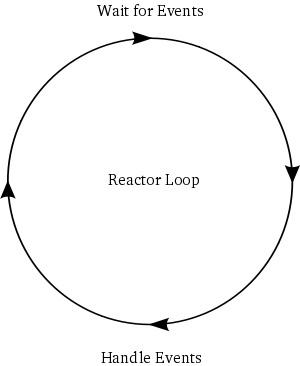
The loop is a “reactor” because it waits for and then reacts to events. For that reason it is also known as an event loop. And since reactive systems are often waiting on I/O, these loops are also sometimes called select loops, since the select call is used to wait for I/O. So in a select loop, an “event” is when a socket becomes available for reading or writing. Note that select is not the only way to wait for I/O, it is just one of the oldest methods (and thus widely available). There are several newer APIs, available on different operating systems, that do the same thing as select but offer (hopefully) better performance. But leaving aside performance, they all do the same thing: take a set of sockets (really file descriptors) and block until one or more of them is ready to do I/O.
Note that it’s possible to use select and its brethren to simply check whether a set of file descriptors is ready for I/O without blocking. This feature permits a reactive system to perform non-I/O work inside the loop. But in reactive systems it is often the case that all work is I/O-bound, and thus blocking on all file descriptors conserves CPU resources.
Strictly speaking, the loop in our asynchronous client is not the reactor pattern because the loop logic is not implemented separately from the “business logic” that is specific to the poetry servers. They are all just mixed together. A real implementation of the reactor pattern would implement the loop as a separate abstraction with the ability to:
- Accept a set of file descriptors you are interested in performing I/O with.
- Tell you, repeatedly, when any file descriptors are ready for I/O.
And a really good implementation of the reactor pattern would also:
- Handle all the weird corner cases that crop up on different systems.
- Provide lots of nice abstractions to help you use the reactor with the least amount of effort.
- Provide implementations of public protocols that you can use out of the box.
Well that’s just what Twisted is — a robust, cross-platform implementation of the Reactor Pattern with lots of extras. And in Part 3 we will start writing some simple Twisted programs as we move towards a Twisted version of Get Poetry Now!.
Suggested Exercises
- Do some timing experiments with the blocking and asynchronous clients by varying the number and settings of the poetry servers.
- Could the asynchronous client provide a
get_poetryfunction that returned the text of the poem? Why not? - If you wanted a
get_poetryfunction in the asynchronous client that was analogous to the synchronous version ofget_poetry, how could it work? What arguments and return values might it have?
Terry Jones (@terrycojones)
I think you should explicitly point out that the async client completes in 10 seconds, as opposed to 23 for the blocking, and relate that back to the gray areas in your original diagrams.
dave
Excellent point. I think I meant to do so, but then forgot. I shall add it!
Alfredo
Hi all,
i'm a absolute beginner with Twisted anf asynchronous programming, but i also looked at Stomp and Message Queue Architecture from the tutorial at "http://cometdaily.com/2008/10/10/scalable-real-time-web-architecture-part-2-a-live-graph-with-orbited-morbidq-and-jsio/".
That tutorial showcases a data broadcast (Simple Real-Time Graph) where data is produced from a "data_producer.py" launched on the server and sent to the connected client towards stomp channels (using Twisted's LoopingCall object) every second, then in synchronous way.
There was the code (from "data_producer.py"):
+-------------------------------------+
class DataProducer(StompClientFactory):
def recv_connected(self, msg):
print 'Connected; producing data'
self.data = [
int(random()*MAX_VALUE)
for
x in xrange(DATA_VECTOR_LENGTH)
]
self.timer = LoopingCall(self.send_data)
self.timer.start(INTERVAL/1000.0)
def send_data(self):
# modify our data elements
self.data = [
min(max(datum+(random()-.5)*DELTA_WEIGHT*MAX_VALUE,0),MAX_VALUE)
for
datum in self.data
]
self.send(CHANNEL_NAME, json.encode(self.data))
reactor.connectTCP('localhost', 61613, DataProducer())
reactor.run()
+-------------------------------------+
Now, i saw your examples, however i want to modify that code from the tutorial to realize monitoring session that broadcasts data generated from data_producer in asynchronous way, as soon as they were received from the outside world and immediately processed towards the stomp channels.
I tried to modify "recv_message" and "send_data" defs and make it work, but with no success: data were generated and shown onto the stdout but not sent towards connected clients, with orbited, python stomper's or stompservices' example programs (stompbuffer-rx.py), etc.
Can you help me to undestand with simple examples how handling Twisted functions to implement these asynchronous capabilities without using LoopingCall object?
There is my simple code:
+-------------------------------------+
class DataProducer(StompClientFactory):
def recv_connected(self, msg):
# Once connected, I want to subscribe to my the message queue
self.data = "Initialize..."
# What goes now at this point? <------------
??????????? # <---------------------------
def send_data(self):
try:
while 1:
# Read data (this is a string) from outside world
frame=RecData(smon)
# Show it towards stdout
WriteLog(frame)
#
self.data=frame
self.send("broadcast/monitor", json.encode(self.data))
except ...
reactor.connectTCP('localhost', 61613, DataProducer())
reactor.run()
+-------------------------------------+
Thanks for your appreciated help.
Alfredo
dave
Hi Alfredo, I'm afraid I've never used the Stomp protocol, so I'm not familiar with those libraries.
Petr
Hi Dave,
what if all servers client connects to, are fast, i.e. sockets can be read always without waiting for data. Then a blocking client would be as fast as non-blocking, right? If so, would it help to run downloads in threads?
Petr
dave
Sockets that can always be ready are really fast sockets :) But in that case a blocking client would never actually block so it would be just as fast. At that point multiple threads could help (on a multi-core machine), though keep in mind that Python has some limitations in that area. Multiple processes are another option (again, assuming you have more than one CPU).
Lucian
Hello, Dave.
I'm following your tutorial, and I'm confused by your third suggested exercise. Can you explain in other words what you mean by having the 'get_poetry' function work in an analogous way? Are you referring to the possibility of turning it into a generator that yields poetry as soon as it receives it?
dave
Hi Lucian, pondering what 'analogous way' might mean for an asynchronous version of the client is really the point of the exercise, and I'm not claiming there is one right answer. It's a thought experiment, not a call for working code. Later Parts will show what Twisted's answer is, but a generator is certainly an interesting direction to go in.
Lucian
Actually, my confusion comes from the meaning of the word "analogous" and what you mean by it. The dictionary says that "analogous" means "similar", so question 3 would be "If you wanted a get_poetry function in the asynchronous client that worked in an similar way, but asynchronously ...". If that's the correct meaning, then my question is "Similar to what?"
dave
I mean similar to the synchronous version of 'get_poetry', subject
to the constraint that the new version has to be asynchronous. I
re-worded the question so hopefully it's a little clearer.
The word 'analogous' sort of means 'similar' but not exactly in the
same way as 'similar' means similar :) I'll do my best to explain what
'analogous' means to me.
Two things (or concepts) are analogous if there is some correspondence
between them given some mapping. For example, you might say the Sun is
analogous to the nucleus when you map the solar system to the atom.
At a physical level, of course, they aren't really similar at all. The
analogy is at a much higher, conceptual level, and even then it's not
exact. An analogy is a rough correspondence, subject to the
constraints implied by the mapping (and the mapping is rough too,
i.e., the atom exhibits behaviors that the solar system doesn't, and
vice versa).
Saying the Sun is analogous to the nucleus means the Sun would play
roughly the same role as the nucleus if you were to conceptually map
the solar system to the atom.
So another way of putting exercise #3 is:
To answer the question you have to come up with a way of mapping a
synchronous system to an asynchronous one. And since there is more
than one way of doing the mapping, there is more than one way to
answer the question.
In the Twisted way, which we explore in the rest of the series,
the asynchronous 'get_poetry' returns an object that represents
the future value of the poem (which isn't there yet since the
function is asynchronous).
Hope that helps.
Lucian
Ok, Dave. Thanks for the explanation. I believe things will become clearer as I move forward with the tutorial.
Max
Hello Dave,
Excellent tutorial! Thank you.
Although I read your disclaimer about windows users - here is a little fix that will make your examples available to those who prefer microsoft:
in blocking-client/get-poetry.py on line 35
change
if ':' not in addr:
host = ''
to
if ':' not in addr:
host = '127.0.0.1'
dave
Thank you, fix applied!
Kashif
Hey, lovely tutorial.
Am I correct in saying that in the async client, the following line doesn't really do anything?
sockets = list(sockets) # make a copy
dave
Not quite. It makes a new list with the same elements as the original list passed to the function.
And it does that because it's modifying the list in the loop, taking out sockets until they are all
done. For the purposes of this client it probably doesn't matter, but just as a general practice
I try not to change mutable objects passed as function arguments unless the function is specifically
supposed to do so.
Glad you like the tutorial!
Thomas
Dave the above fix also needed to be applied to the async host to get it to work on windows.
Mark Wallace
hi Dave, nice stuff. Altho I can't actually get the example to work (on OSX 10.6).
It gets into the serve() function, but when it tries to execute the listen_socket.accept(), it hangs. The traceback on Ctrl-C indicates the last call was File "/Library/Frameworks/Python.framework/Versions/2.7/lib/python2.7/socket.py", line 202, in accept
sock, addr = self._sock.accept()
any ideas? since I would love to at least get through the first installment of what seems like a nice piece of work :)
cheers!
dave
Hey Mark, the accept() call blocks until a client tries to connect to the socket. So you'll need to open four shells,
three to run a server, and one to run the client. Does that make sense?
Mark Wallace
Completely and totally. (And it works!) Many thanks for your being the kind of genius that can answer the simplest questions well (hardest kind).
dave
You are welcome, sir!
April
Hi Dave,
Thanks for the great tutorials! I'm learning a lot. I had one question though -- where are the poems supposed to download to? I tried looking for them to verify that everything was working right, but I couldn't find them.
Thanks!
dave
Hi April, the clients just get the poems from the servers, but they don't store them on disk anywhere. The later clients print them out so you can see they were downloaded.
joshuagame
a perfect intro to async matters.
Maybe one of the clearest i've ever read. Thx a lot :)
dave
Thank you, you are welcome!
Nishith
Hi Dave,
Thanks for the excellent tutorial. I am new to network programming so this is really helpful. Quick question - in the code for async-client, line # 75
bytes += sock.recv(1024)
if not bytes:
break
Lets say a server is ready to dish out 2000 (> 1024) bytes, wouldn't we keep calling RECV on that socket, without breaking out of the loop, since bytes is being appended to.
Thanks
admin
Hi Nishith, with this particular client it would loop around and read some more bytes, just as long as there were bytes ready to be read. But once we had read all the bytes that were available, we would get a socket exception with EWOULDBLOCK since the socket is in non-blocking mode, causing us to break out of the loop.
Now in a real program, you would want to limit the total number of bytes you read in one go, to avoid a really busy socket from starving the others.
Does that make sense?
Nishith
Thanks Dave, it makes sense now.
Alan
Excellent tutorial! One of the best I've ever seen!
dave
Thanks so much, glad you like it!
darkdarkfruit
good job, dave !
btw, what tool do you use to make those Figures(pictures) ? They seems nice
dave
I use Inkscape which is a lovely tool for creating figures.
darkdarkfruit
It really is a powerful tool.
Thanks.
dogbearmonkey
Hello Dave
Thank you for providing such a nice tutorial. Unfortunately I allready fail in the beginning. Starting the slowpoetry.py server doesn't stream any poetry :(
I get something like this:
Serving poetry/ecstasy.txt on port 39786.
Traceback (most recent call last):
File "blocking-server/slowpoetry.py", line 98, in
main()
File "blocking-server/slowpoetry.py", line 94, in main
serve(sock, poetry_file, options.num_bytes, options.delay)
File "blocking-server/slowpoetry.py", line 76, in serve
sock, addr = listen_socket.accept()
File "/usr/lib/python2.7/socket.py", line 202, in accept
sock, addr = self._sock.accept()
I have python 2.7 and run Ubuntu 11.04
Thanks alot :)
dave
Hey Adrian, I'm not sure what might be going wrong. I am currently running the same versions
of Python and Ubuntu and the blocking server works ok for me. Could you post the exact command
you are running, and the complete traceback including the error message at the end?
Thanks, and glad you like the tutorial.
dogbearmonkey
Hi Dave and thank you for your fast reply.
I actually don't get an error. That traceback is because of keyboard interrupt. I get the line:
Serving poetry/ecstasy.txt on port 39786.
and then nothing more. Changed parameters for how many bytes or time don't help either. Are their ports I could try? I have Tor installed, maybe (even if I can't explain it) that has something to do with it.
dave
Ah, ok. In that case it is working just fine. Once you start the poetry server, you need to
use a poetry client to connect to it. As a test, you can use the 'netcat' program. Run
'netcat 12345' where '12345' is the port the poetry server chose. That should print
out the poem (and the poetry server will print out a line as it sends bits of the poem).
Next try the blocking client: python blocking-client/get-poetry.py 12345
Does that work?
dogbearmonkey
Thank you Dave. I really missed that point :) You're my todays hero.
dogbearmonkey
And you're fast!
dave
You are welcome!
athlon
Wow, thanks for your tutorial Dave. It's very practical and also very creative. I love the way the developers integrates other things like philosophy, literature or mathematic ... into the program.
dave
You are welcome, glad you like it!
Amit
Again beautifully written but I am not sure what we have to do in 3rd exercise .
To make it like analogous to sync way , it must have a loop(that's what i think) to make sure that all sockets are closed(.i.e all poems are read).
As per arguments , I think we should pass the starting point from where the poem have to be read , which should be initialized to zero in starting and then after each socket.recv(Bytes) , it should be updated according to number of bytes read so far .
And it should return the bytes (data).
Am i right or missing anything ?
dave
Hi Amit, the third exercise is just a 'thought experiment', there is no coding
unless you really want to give it a try.
There's no right answer, really, but your idea is very interesting. I guess you
are proposing something where get_poetry() takes a socket and only reads
as much as it can, returning those bytes?
There's no need to spend too much time on this one, but what if you wanted
a function that conceptually would return the whole poem, but was asynchronous?
Twisted's answer to that question is coming in the next series of Parts.
umi
Hi Dave! Thank you for this tutorial!
I have some questions.
1) If I comment out line #105 (sock.setblocking(0)) nothing really changes. The client works in exactly the same way, at least as far as I can see. Could you please explain what parts of the code this line should affect? How do I start the servers (i.e. what options do I use) to see the effect of this line?
2) I also don't understand lines 71-78. I have removed exception handling to see the exception itself, but it was never thrown.
dave
Hey Umi, glad you like the tutorial, and great questions.
You are right that, at least on a Linux system, it will work the same. The reason is that
we only try to recv() from the socket once and we do that when select has told us there is
data to be read. It might behave differently on another system, but I don't know for sure.
If we were to try getting data from the socket multiple times, then we would start seeing
a difference. I'll send you an alternate version that does that. Try putting a print statement
into the exception handler first and see that it gets raised. Then set the socket to blocking
and see what happens. Try setting the server delay to a long value like 10 seconds too.
umi
Thanks again, Dave!
vu
Hi Dave
What do you mean by "try getting data from the socket multiple times"? My understanding is that
inside the loop (for sock in rlist) we can have multiple sock.recv(1024). Please correct me if I'm wrong.
Once more question is, when errno.EWOULDBLOCK is caught, the task will finish and be removed. Whereas I think EWOULDBLOCK means the data is temporarily unavailable and we can comeback later. Again, please correct me if I'm wrong.
And great tutorial by the way. Much appreciated!
dave
Hey Vu, you are right, that is the correct meaning of EWOULDBLOCK. In this case, however, because the select call has identified it as ready for I/O, the first call to recv will never block. A former version of the client had an inner loop where it was actually possible to get the EWOULDBLOCK exception. I think I will put it back in, minus a former bug :) This version will hopefully make more sense, since there is an inner loop that tries to recv() from the socket multiple times.
viv
Dave, Thanks a ton for your post.
dave
You are welcome.
Kwami
Hi Dave, this is a great intro to sockets programming. Thanks for taking the time to share your expertise, and answering the questions in the comments; they further clarified some misunderstandings I had :)
dave
You are welcome, glad it was of help to you!
ivan
Excellent tutorial ! Thanks a lot !
dave
Thank you and you are welcome!
Ron Segal
.. Or is it
My sentiments entirely!
Plus a fantastic tutorial, thanks Dave.
dave
Thank you very much!
Harish
Thanks Dave. It couldn't get any easier. For the second question in the exercise section, for get_poetry to return text of each poem it has to return/relinquish control. That would break the reactor loop as it is coupled with business logic, and no sockets are monitored for reads. Am I making any sense..?
Harish Srinivas
Thanks a lot Dave, couldn't get any easier. I guess the reason why get_poetry() cannot return text of each poem is that the function would have to release control hence breaking the loop as both the reactor and business logic are tightly coupled..?
dave
I think you have it -- the function cannot return the text of the poem because in order to do so it would have to wait for all the text to arrive and thus would be a blocking function.
Michael
Hi Dave, great introduction. You state:
"If the synchronous client always contacted a fixed number of servers (say 3), it wouldn’t need an outer
loop at all, it could just call its blocking get_poetry function three times in succession."
Correct me if I'm wrong. But you're saying that because we do not how many servers the client will contact, the WHILE loop is necessary. If we knew definitively that there were 3 servers, then we'd only do 3 calls, or a WHILE i<3. Is that accurate? Thanks again.
dave
Pretty much, I'm saying that the synchronous client needs a loop (it could be a
forloop) simply because the number of servers to contact isn't known to start with. The asynchronous client needs a loop even if the number of servers is known in advance.mitch
(this is extremely minor) in async-client, you are using reverse logic on the if statements.
instead of:
if not something:
pass
else: # not not something
pass
you could just do
if something:
pass
else: # not something
pass
imo it makes the code much easier to read
dave
Agreed, that's a good point. And cognitive research backs you up!
codenet17
Hi Dave
I tried get_poetry.py in one terminal and used the client.py in another.
In get-poetry.py , after the poetry is sent completely it dosen't exit the program. If i use Ctrl-Z to exit the program and try it again it shows errors , then i have to restart my terminal to use get-poetry.py . Any fix for this?
Use sys.exit probably.
Thanks and i am following your tutorials. They are amazing. Thanks a lot
dave
Thanks! It's hard to know what's going wrong without some output, could you show the errors? I don't know of any bugs in the client.
Faisal
Hello Dave,
Thanks for awesome tutorial.
My question is regarding data = "" in async-client/get-poetry.py file, are we not getting all data from three sockets into same variable which might corrupt the data it stores. Seems that's working fine ,but not sure how.
Could you pls shed light on it.
dave
Sure, the data is only read from on socket at a time, and the
poemsdictionary holds a mapping from socket numbers to the poetry data. That's how they are kept separate.Talha Tariq
How did you make this website?
dave
This is a wordpress site.
vinay
hi dave , thanks for these really nice tutorials.
I have a question
for sock in rlist:
Here in the code we declare an empty string // data=" " // and then later in the loop we check // if not data // my question is if the condition satisfies then why the socket comes in the rlist in the first place , is there a different between socket with no data to read and a socket which is not ready to be read.
dave
Hi there, so the
if not datacheck there is handling the case where the socket has been closed.sachidananda sahu
Really thinks for nice tutorial :-) Hats off :-)
I also have a similar doubt, let me break it in to multiple question.
1> A socket will be added to rlist after select unblocks in case of i > Any data is ready to read and also ii> In case the socker is closed ?
Because in this case only (if not data: ) scenario will come, where there is no data to read but socket is closed from server end.
2> When this condition will be checked ?
else:
if not new_data:
break
Because this else part comes if a socket is ready to read and there is no exception as it's not blocking for that socket.
So i am basically confused about this two cases ?
Russell Sher
Hi Dave and thanks for the great tutorials.
Just a curiosity: When I run python blocking-server/slowpoetry.py --port 10000 poetry/ecstasy.txt --num-bytes 30 a git window, and then run python blocking-client/get-poetry.py 10000 another git window, my download of 1 poem takes 1minutes 11 sec: Task 1: got 3003 bytes of poetry from 127.0.0.1:10000 in 0:01:11.119364
Got 1 poems in 0:01:11.119364
I am using windows - It seems much longer than your results as shown above.
regards
Russell
dave
Hi Russell, I'm not sure what the difference might be -- it's been a long time since I did anything on Windows.
uvok
The rate of sending was changed a while ago, that's the reason :)
https://github.com/jdavisp3/twisted-intro/commit/95e05c03b862e769413645feca28515aabab0e71
clexp
Thank you thank you thank you for this brilliant demo, walkthrough and tutorial. Thank you for putting the trial material on git hub (and making it!) thank you for assuming little on the readers' side, that was really helpful. Your series is well considered and well executed. Bravo and thank you.
dave
So glad you liked it and thank you for the kind words!